Your AI Writing Shows
🎯 Learn how to hide AI's biggest giveaway, then put OpenAI Codex to work for you.

Hey there 🧠
Ready for another day of staying ahead of the competition in the Growth race?
Oh and before we go ahead! If your friend sent this to you, be sure to subscribe here! So you don’t miss out on any editions.
In Partnership with Omnisend
10 ways your favorite AI can improve email marketing
What if we told you that in under 30 seconds, you can see your subscriber growth trends and your latest campaign activity without opening a single dashboard?
That's one of 10 ways Omnisend’s new guide puts your AI to work. Others pinpoint which email in your welcome flow earns the most, catch rising bounce rates before they cost you opens, or hand you a lapsed-buyer segment with the email already drafted.
There is no new chatbot or separate AI platform to learn. Omnisend connects directly with ChatGPT and Claude, so you can ask questions about your campaigns, automations, and subscribers inside the AI tools you already use.
Haven't used Omnisend before? More than 150,000 ecommerce brands use it for email and SMS marketing, and they average $79 back for every $1 spent.
Migration is free, takes up to five business days, and plans cost up to 35% less than Klaviyo's.
💡 How To Make AI Writing Sound Human
AI can help you write faster.
But if your content sounds like everyone else's, readers notice, even if they can't explain why.
According to Oskar Duberg at WordStream, a few simple changes can make AI-generated writing feel far more authentic.
Here's how to do it.
1️⃣ Vary Your Sentence Length Avoid writing every sentence with the same rhythm. Mix short, medium, and long sentences to create a more natural reading experience.
2️⃣ Be Specific Replace vague claims like "improves results" with concrete details, limitations, or situations where your advice actually applies. Specificity builds credibility.
3️⃣ Write Stronger Headlines If a competitor could copy your headline without changing a word, it's too generic. Include a unique outcome, audience, or insight that makes it unmistakably yours.
4️⃣ Support Claims With Evidence Add examples, numbers, case studies, or real experiences. Even one specific proof point makes your writing feel more trustworthy.
5️⃣ Have A Point Of View The biggest giveaway of AI writing is the absence of opinion. Share your experience, make a clear recommendation, and let your personality come through instead of sounding neutral about everything.
Why It Works
People trust writing that feels personal, specific, and backed by real experience. Adding variation, evidence, and original opinions transforms AI from a writer into a drafting assistant rather than the final author.
👀 Real-Life Example (WordStream)
Oskar Duberg analyzed the most common signs of AI-generated writing and found that generic headlines, repetitive structure, vague claims, and missing opinions consistently make content feel artificial. Small edits to these areas can dramatically improve authenticity.
The Takeaway
Don't let AI publish your first draft. Let it help you write faster, then add the details, examples, and perspective that only you can provide.
💡 How To Automate Tasks With OpenAI Codex
Repetitive desktop tasks can consume hours every week.
With OpenAI Codex, you can automate many of those workflows by simply describing what you want AI to do.
Here's how to get started.
1️⃣ Enable Computer Use Open OpenAI Codex, go to Plugins, enable Computer Use, and start a new task.
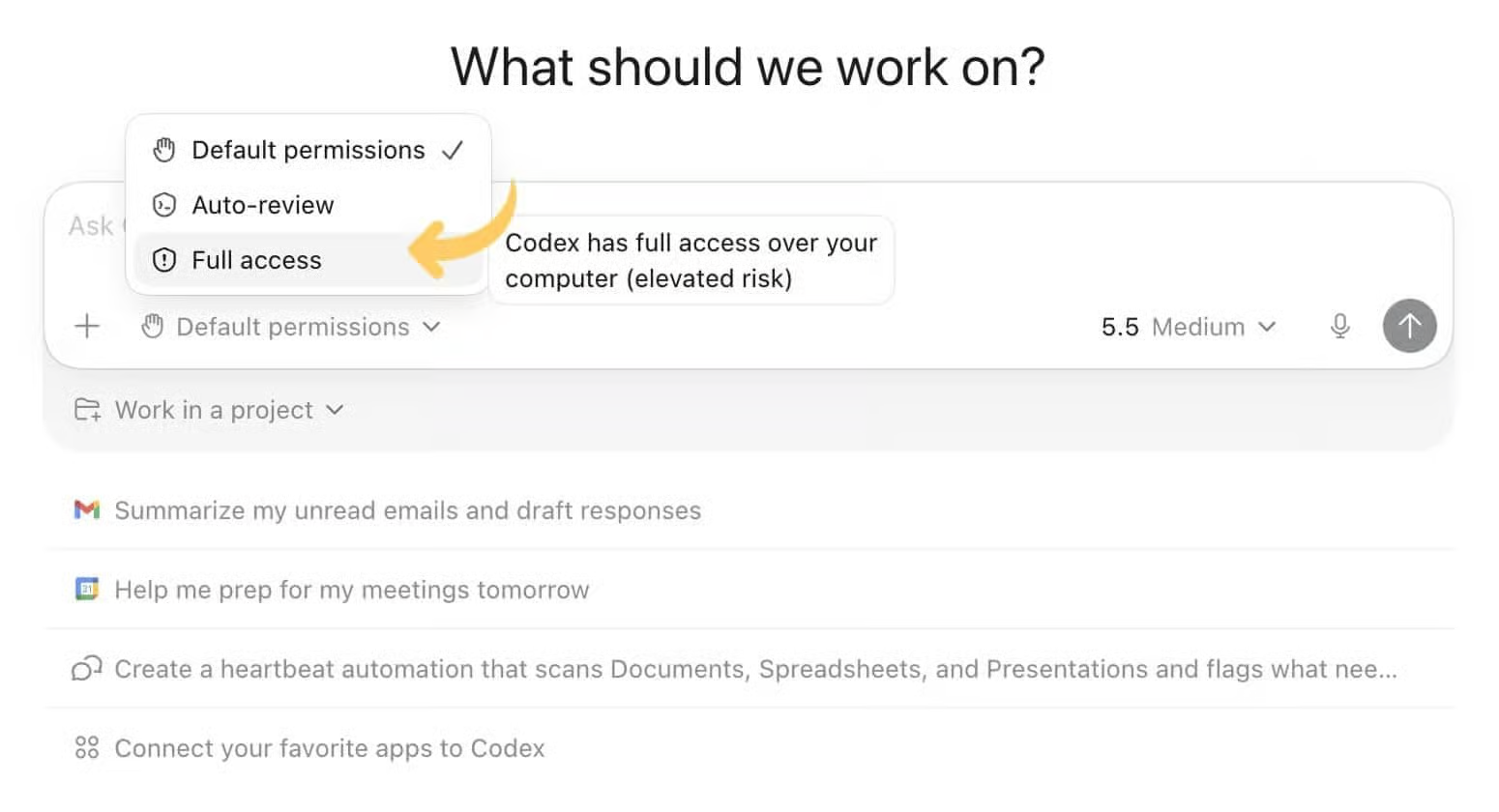
2️⃣ Grant The Right Permissions Change permissions from Default to Full Access, then approve any prompts required for Codex to interact with your computer.
3️⃣ Describe Your Task Tell Codex exactly what you want it to do.
Use this prompt:
"Open [app/website/file], complete [task], then summarize the results and ask before making any major changes."
4️⃣ Automate Repetitive Work Codex can organize files, update spreadsheets, test websites, navigate apps, and complete many routine desktop workflows with minimal guidance.
5️⃣ Review Before Confirming Always review the results before approving significant changes, especially when working with important files, business systems, or sensitive information.
Why It Works
Instead of manually clicking through repetitive workflows, you simply describe the objective. Codex performs the task, summarizes the outcome, and asks for approval before making major changes.
The Takeaway
OpenAI Codex turns natural language into desktop automation. Use it to eliminate repetitive work, but always verify important actions before giving final approval.
As we prepare more "Growthful" content, we'd love to hear your thoughts on today's edition! Feel free to share this with someone who would appreciate it. 🥰