The seasonal bidding edge
🧩 Optimize Google Ads for short surges, and supercharge Gemini with NotebookLM.

Hey there 🧠
Ready for another day of staying ahead of the competition in the Growth race?
Oh and before we go ahead! If your friend sent this to you, be sure to subscribe here! So you don’t miss out on any editions.
Partnership with Athyna

Connecting LLMs to production systems means handling rate limits, context windows, prompt versioning, and error states that most teams underestimate. You need engineers who understand the full integration stack and ship features that hold up under load.
- Python and JavaScript expertise
- LLM and API integration at scale
- Production-tested implementations
- 40–60% cost savings
This is the kind of talent you get with Athyna Intelligence—vetted LATAM engineers working in U.S.-aligned time zones.
💡 How To Use Seasonality Adjustments In Google Ads To Improve Performance
One-week conversions are flying. The next week's performance stalls.
Google’s Smart Bidding is powerful, but it relies heavily on historical data. When short-term spikes or dips hit, it does not automatically know they are temporary. That is where seasonality adjustments come in.
1️⃣ What Seasonality Adjustments Actually Are: Seasonality adjustments are manual signals you send to Google Ads to inform Smart Bidding about expected short-term changes in conversion rates. They help strategies like Target ROAS or Target CPA react properly without overcorrecting based on a brief surge or drop.
2️⃣ Why They Matter For Revenue: Without adjustments, Google may underbid during high-demand events like flash sales, leaving revenue on the table. Or worse, it may overbid after a promotion ends because it assumes the spike represents a new baseline. Seasonality adjustments keep the algorithm aligned with reality.
3️⃣ When To Use Them: Use seasonality adjustments for short-term events that typically last one to seven days. Examples include holiday promotions, limited-time offers, product launches, or even predictable slow periods like the week between Christmas and New Year. They act like a scalpel, not a permanent override.
4️⃣ When Not To Use Them: Do not apply them for long term trends such as an entire seasonal cycle. Smart Bidding is designed to adapt to gradual shifts. Overusing manual interventions can confuse the system and reduce stability.
5️⃣ How To Implement Them Properly: You can set seasonality adjustments in the Tools section under Budgets and Bidding. Apply them to specific campaigns if needed, especially when only certain product lines are affected. Always review results after the event ends to validate your assumptions and align your team on performance insights.
The Takeaway
Seasonality adjustments help you guide Smart Bidding during temporary fluctuations. Used thoughtfully, they prevent costly overreactions and protect revenue during both surges and slowdowns. The goal is not to outsmart the algorithm, but to inform it when the rules temporarily change.
💡 How To Connect NotebookLM To Gemini
Generic AI answers are helpful. Contextual AI answers are powerful.
By connecting NotebookLM to Gemini, you allow Gemini to pull directly from your curated sources instead of relying only on general knowledge.
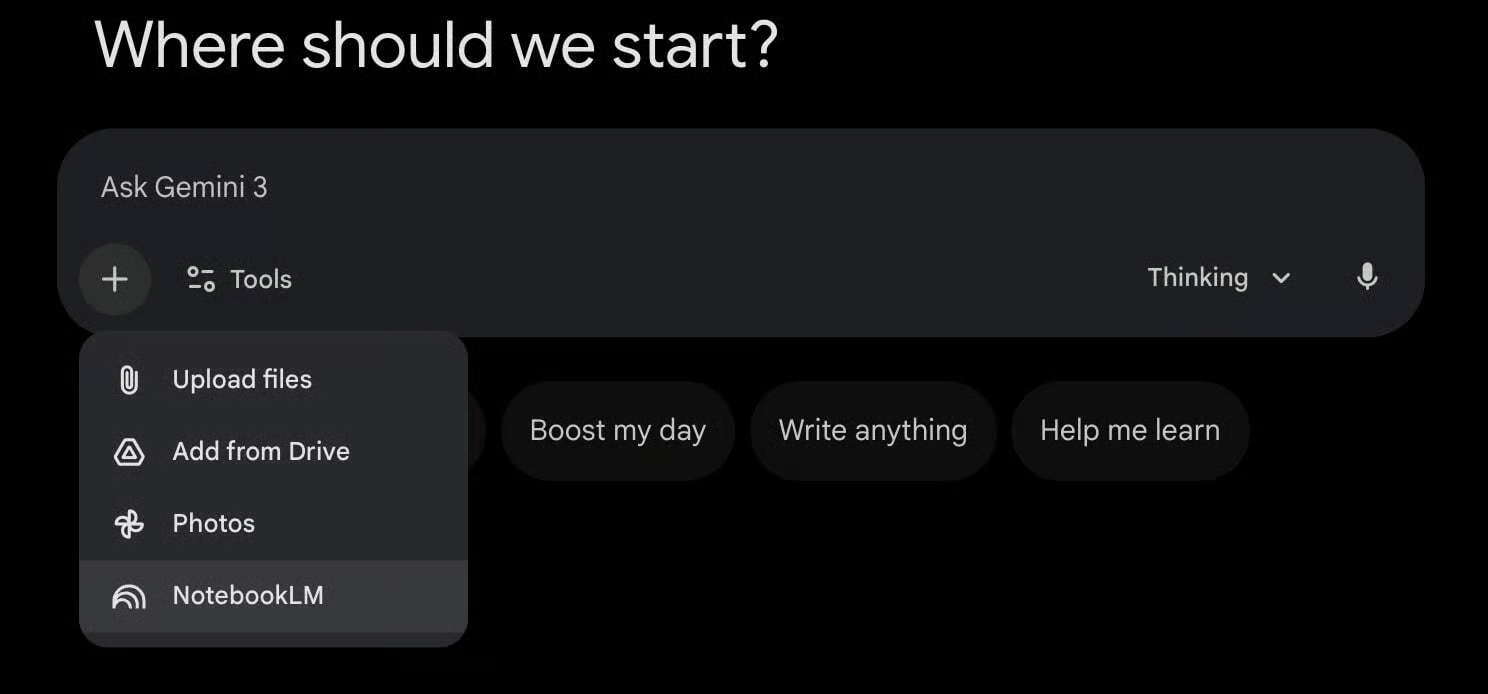
Here is how to set it up.
1️⃣ Create A Notebook In NotebookLM: Go to NotebookLM and create a notebook. Upload or link your sources, such as PDFs, YouTube videos, research documents, or personal notes. Think of this notebook as your private knowledge base.
2️⃣ Open Gemini And Add The Notebook: Inside the Gemini chat interface, click the plus icon. Select NotebookLM and choose the notebook you want Gemini to reference. This connects your curated database to the conversation.
3️⃣ Prompt With Clear Instructions: Once connected, instruct Gemini to use only the notebook contents. For example, ask it to treat the notebook as a content database and generate a LinkedIn-ready infographic with a strong hook, key insights, and a clear problem to takeaway structure.
4️⃣ Generate Context-Driven Outputs: Gemini now pulls directly from your uploaded materials. Instead of broad summaries, you get answers grounded in your exact sources. This ensures accuracy, alignment, and brand consistency.
Why It Matters: Most AI outputs lack specificity because they rely on general data. Connecting NotebookLM transforms Gemini into a context-aware assistant that works from your proprietary information.
The Takeaway
When Gemini is connected to NotebookLM, it stops guessing and starts referencing. By feeding it curated sources, you generate content that is precise, relevant, and aligned with your unique knowledge base.
As we prepare more "Growthful" content, we'd love to hear your thoughts on today's edition! Feel free to share this with someone who would appreciate it. 🥰