The AI Chatbot myth busted
🚀 Discover when chatbots actually convert, then teach Claude to automate your repetitive tasks.

Hey there 🧠
Ready for another day of staying ahead of the competition in the Growth race?
Oh and before we go ahead! If your friend sent this to you, be sure to subscribe here! So you don’t miss out on any editions.
In Partnership with EZ Texting
Your Business Just Got A New Team Member

What if your business suddenly had an extra team member, one who reads every incoming text, writes thoughtful replies in seconds, and helps create campaigns whenever you need them?
With EZ Texting’s AI tools, that’s exactly what you get.
AI Reply learns from your website, knowledge base, and documents to respond to customers accurately and on-brand with just a click. And with AI Compose, you can generate text campaigns in seconds instead of spending an afternoon writing them.
Growth Pulse readers can try AI-powered texting with a free EZ Texting trial - no commitment and no credit card required.
Try AI Texting Free at EZTexting.
💡 When AI Chatbots Increase Sales
Adding an AI chatbot to your website sounds like an obvious win.
But research shows they don't always improve conversions.
Whether a chatbot helps or hurts depends on how difficult it is for customers to make a decision.
Here's when chatbots actually work.
1️⃣ Help Customers Choose For products that are difficult to evaluate, such as clothing, furniture, or products with multiple variations, chatbots increased purchase intentions by 44.7%. They simplify complex decisions and reduce uncertainty.
2️⃣ Skip Simple Purchases If you're selling a small range of straightforward products, such as a few vitamin options, a chatbot often becomes unnecessary friction. Customers prefer buying without extra interruptions.
3️⃣ Large Catalogues Benefit Most Even simple products become difficult to shop when there are too many choices. For stores with large product ranges, chatbots help narrow options and reduce choice overload.
4️⃣ Sound More Human Research found that chatbots using natural conversational language and small interjections like "oh wow" or "aw" made customers up to 49% more satisfied than robotic responses.
5️⃣ Guide, Don't Pressure Helpful recommendations outperform urgency tactics. Instead of saying "Only 3 left," chatbots should confidently explain why a product is a good fit for the customer.
Why It Works
Customers seek guidance only when they feel overwhelmed. A chatbot that simplifies choices reduces mental effort and builds confidence. But when the decision is already easy, the chatbot simply becomes another unnecessary interruption.
The Takeaway
Don't add a chatbot because everyone else is doing it. Add one only when your customers genuinely need help making a decision. When used in the right situations, AI becomes a shopping assistant. When used everywhere, it becomes just another pop-up.
💡 How To Record A Reusable Skill In Claude
If you find yourself repeating the same workflow every day, don't repeat it.
Teach Claude once, save it as a reusable Skill, and run it whenever you need it.
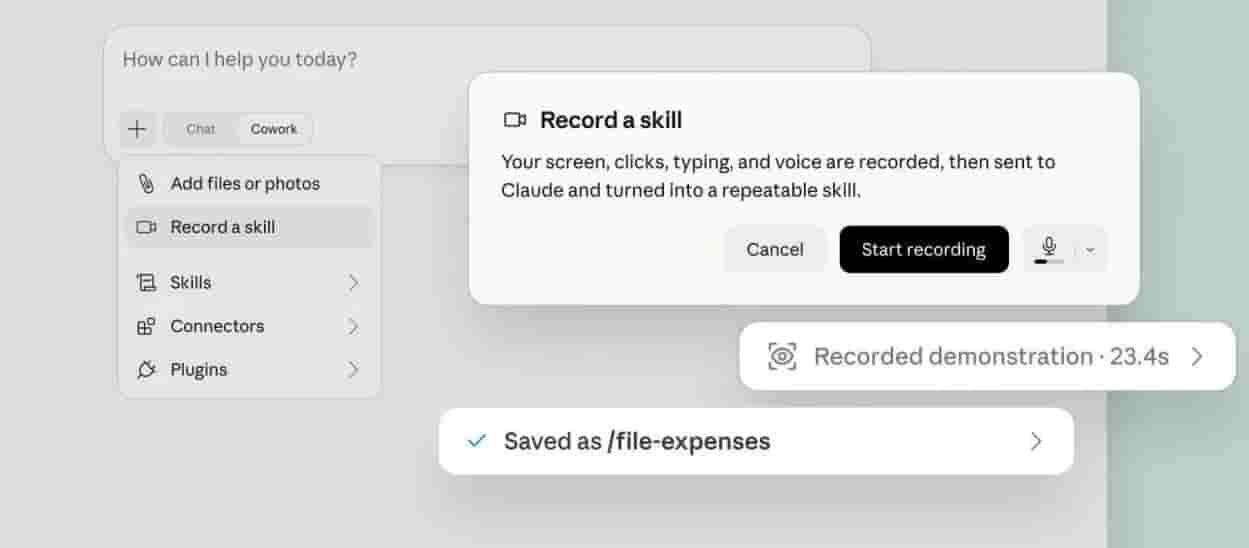
Here's how to do it.
1️⃣ Start Recording Open the Claude desktop app, go to Cowork, click + → Record a Skill, grant screen recording permission, and click Start Recording.
2️⃣ Complete Your Workflow Perform the task exactly as you normally would while narrating each step aloud. Explain what you're doing, why you're doing it, and any important decisions Claude should remember.
3️⃣ Describe Your Logic Mention the goal, the sequence of actions, alternative paths if something changes, and the rules Claude should always follow. Also explain how to verify that the task was completed successfully.
4️⃣ Save The Skill Once the recording ends, Claude automatically packages your workflow into a reusable Skill that can be accessed anytime.
5️⃣ Run Or Automate It Start a new chat and launch your workflow using /your-skill-name. You can also ask Claude to schedule the Skill so it runs automatically at your preferred time.
Why It Works
Instead of prompting AI from scratch every time, Skills capture both your actions and your decision-making process. That makes repetitive workflows faster, more consistent, and much easier to automate.
The Takeaway
If you perform the same task repeatedly, record it once as a Claude Skill. You'll save time, reduce repetitive prompting, and build a personal library of AI-powered workflows.
As we prepare more "Growthful" content, we'd love to hear your thoughts on today's edition! Feel free to share this with someone who would appreciate it. 🥰