Schema is your advantage
🧩 Turn context into citations, and learn how to turn products into polished campaigns

Hey there 🧠
Ready for another day of staying ahead of the competition in the Growth race?
Oh and before we go ahead! If your friend sent this to you, be sure to subscribe here! So you don’t miss out on any editions.
Partnership with Grapevine
📲 Whitelisting That Actually Scales (Creators + Publishers)
Most brands know whitelisting works to lower CPAs and find new audiences. Few can make it repeatable at scale.
Grapevine gives you both creator and publisher networks in one managed service:
Creator Whitelisting - They source, vet, and negotiate with verified creators (doctors, coaches, finance experts, beauty insiders), managing and handling access and production. Authentic social proof without operational chaos.
Publisher Whitelisting - Their network of 14+ niche publishers (including My Subscription Addiction) provides advertorial landing pages and established handles. You get third-party trust plus storytelling space that bridges discovery to conversion.
Whitelisted content outperforms branded ads by 20-30%. Creator + publisher handles deliver signal diversity and testing volume that's hard to replicate independently.
Mapping Q1 creative strategy? Now's the time to test.
👉 Book a strategy call by February 27th for $500 off your first campaign.
💡 Which Schema Markups Should You Use For AI Visibility
AI can crawl your website. But that does not mean it understands it.
Search engines powered by AI struggle with clarity. They can find your content, yet often fail to interpret what it actually represents. Schema markup fixes this by turning plain text into structured, machine-readable context.
If you want to be cited inside AI Overviews, structure is no longer optional.
Here is how to prioritize schema for AI search.
1️⃣ Use FAQ Schema For Extractable Answers: AI platforms love clean, pre-structured responses. FAQ schema packages your answers in a format that models can easily extract and cite. Instead of guessing what matters, analyze support tickets and real customer questions, then structure those answers clearly.
2️⃣ Implement Author Schema For Trust Signals: AI engines prioritize identifiable expertise. Adding Author schema with credentials, affiliations, and verifiable profiles increases your perceived authority. Anonymous content is easier for models to ignore.
3️⃣ Add Organization Schema For Entity Clarity: Without structured organization data, AI may treat your website, LinkedIn, and YouTube as separate entities. Use the Organization schema with an @id property to connect your brand assets into one unified identity.
4️⃣ Apply HowTo And Product Schema Where Relevant: Instructional content should be marked with the HowTo schema so AI recognizes step-based guidance. Product schema ensures pricing, availability, and specifications are treated as verified data rather than unstructured claims.
5️⃣ Validate And Iterate On High Value Pages: You do not need a full site overhaul. Start with one high-impact page, implement relevant schema, and test it using Google’s Rich Results Test. Treat schema as part of your content strategy, not an afterthought.
The Takeaway
AI search runs on context, not guesswork. Schema markup gives your content structure, authority, and clarity. Brands that speak the AI’s language today are the ones most likely to be cited tomorrow.
💡 How To Turn A Product Photo Into A Full Campaign Shoot
Professional campaign shoots used to require studios, photographers, and weeks of coordination. Now you can generate campaign-ready visuals from a single product photo.
AI tools like Pomelli extract your branding and transform static images into styled marketing assets in minutes.
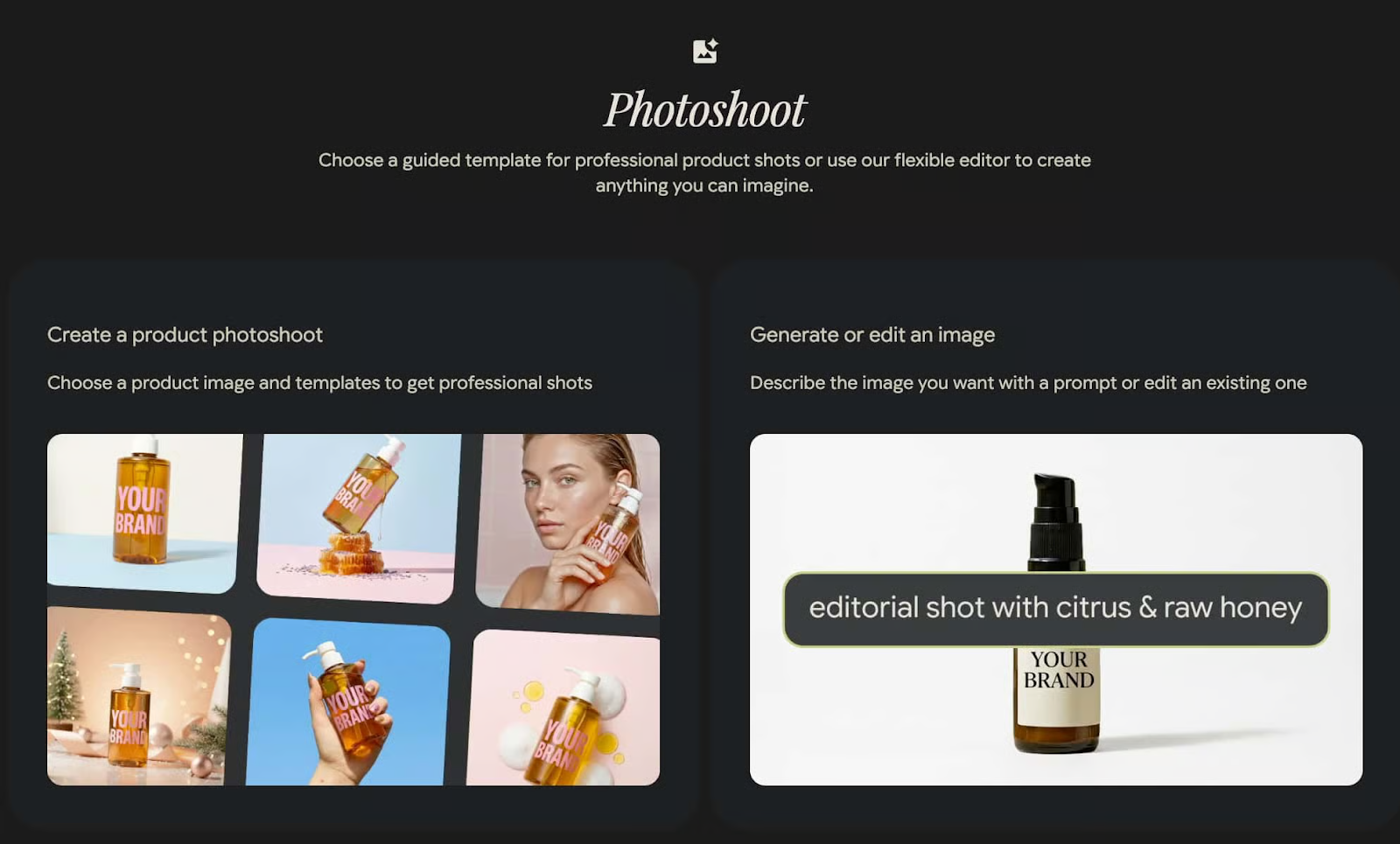
Here is how to do it.
1️⃣ Create A New Photoshoot: Go to Pomelli and click on Create Photoshoot. This opens the workspace where your campaign visuals will be generated.
2️⃣ Import Your Brand Assets Automatically: Drop in your company’s website link. Pomelli extracts your logo, visual identity, and brand voice to align the shoot with your existing positioning.
3️⃣ Upload Your Product Image: Add a clean product photo and select a template that matches your campaign goal, whether lifestyle, studio, seasonal, or promotional.
4️⃣ Generate Campaign Visuals: Let the AI produce professional-grade images styled like a full campaign shoot. Backgrounds, lighting, and composition are adjusted automatically.
5️⃣ Customize And Refine: Edit the header, description, or visual elements to match your messaging. Adjust layout or creative direction as needed.
6️⃣ Export In Your Preferred Format: Choose your desired format and download instantly for use across ads, landing pages, or social media.
The Takeaway
You no longer need a full production team to create campaign-quality visuals. With the right tool, one product photo can become an entire creative asset library ready for launch.
As we prepare more "Growthful" content, we'd love to hear your thoughts on today's edition! Feel free to share this with someone who would appreciate it. 🥰