Google Ads for subs
📊 Paid subscriber strategies, and how to turn links into polished infographics

Hey there 🧠
Ready for another day of staying ahead of the competition in the Growth race?
Oh and before we go ahead! If your friend sent this to you, be sure to subscribe here! So you don’t miss out on any editions.
Partnership with Belay
Growth hides finance mistakes until it’s too late

Hitting $50k, $100k, even $250k a month feels like momentum. But this is where many operators quietly lose control. Not because revenue slows, but because decisions start getting made on numbers that are already outdated.
When financials are updated retroactively, you are always driving in the rearview mirror. Hiring feels right until cash tightens. Spend looks justified until margins disappear. DIY accounting works early, then cracks as complexity scales.
This is the inflection point where smart founders and operators pause and reassess:
👉 What changes when your financials are updated weekly instead of retroactively?
👉 Why does delayed financial data cause bad decisions even when revenue looks healthy on paper?
👉 What breaks first when founders try to “DIY accounting” while scaling growth and operations?
BELAY’s fractional finance model gives you U.S.-based experts who take ownership of your books and surface weekly clarity before problems compound.
If finance feels heavier as you grow, that is the signal.
Download the Guide to Outsourced Accounting and regain control!
💡 How To Get YouTube Subscribers With Google Ads
Growing subscribers organically takes time. But if your goal is to reach a milestone faster, Google Ads offers a legitimate shortcut. Not hacks. Not bots. Actual paid distribution inside YouTube’s ecosystem.
There are two very different ways to do it, and the tradeoffs matter more than most people realise.
1️⃣ YouTube Promotions Inside YouTube Studio: This is the simplest option. If you have ever boosted a post on Instagram or TikTok, this will feel familiar. You go into YouTube Studio, pick a video, and select Audience Growth as the goal. YouTube then pushes the video as an in-feed promotion to potential subscribers. Setup is fast, friction is low, and you are live in minutes.
2️⃣ Demand Gen Campaigns Inside Google Ads: This route is for advertisers who want control. You need to link your YouTube and Google Ads accounts, then create a Demand Gen campaign directly in Ads Manager. The advantage is precision. You can set a target CPA, control budgets tightly, and build more advanced audience targeting. The downside is complexity. Setup takes longer and requires more decisions.
3️⃣ Which One Actually Performs Better: A direct comparison test revealed a clear split. YouTube Promotions were far more efficient. Cost per subscriber landed around one dollar, with a very high subscriber conversion rate. Demand Gen campaigns were more expensive per subscriber, but delivered higher view rates. That suggests better content alignment, even if fewer people subscribed.
4️⃣ Three Caveats Before You Spend: First, reporting inside YouTube Studio is limited. You will need to dig into Google Ads reports to see deeper performance metrics. Second, subscriber quality can be questionable. High conversion rates may mean you are reaching people who subscribe easily, not necessarily people who will engage long-term. Third, paid views do not count toward YouTube Partner Program watch time. Subscribers do count toward the subscriber threshold, but views do not help monetisation eligibility.
The Takeaway
It is a tool. If you need to cross a subscriber milestone, it can bridge the gap effectively. Just be clear about what you are buying. A number. Not guaranteed loyalty.
💡 How To Create Stunning Infographics With NotebookLM
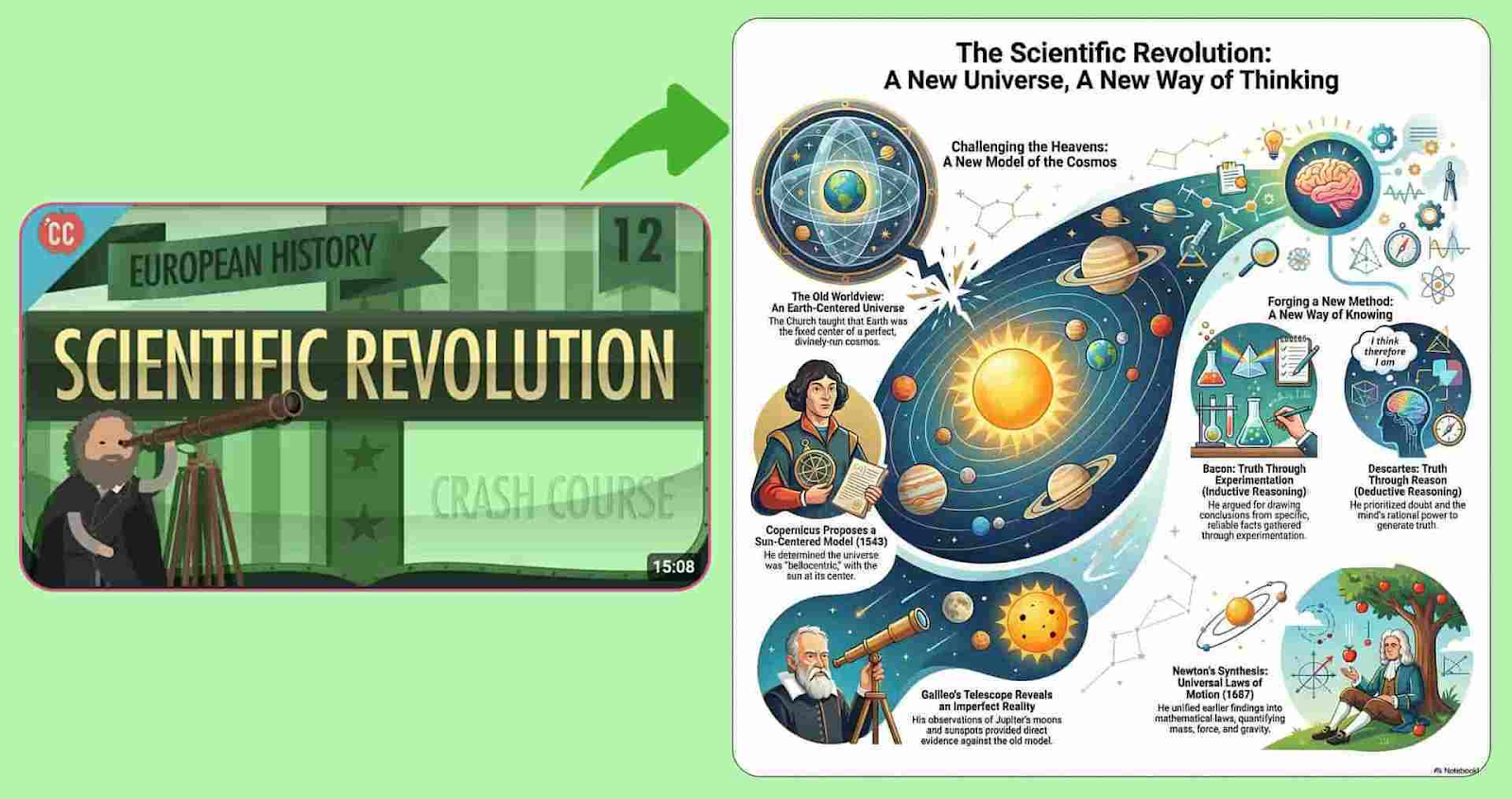
Infographics usually take time. You gather sources. Extract insights. Brief a designer. Iterate on layout. By the time it is done, the insight feels old.
NotebookLM collapses that entire workflow into minutes by turning sources directly into visual output.
Here is how the process works.
1️⃣ Start With A Source First Workflow: Open NotebookLM and create a new notebook. Instead of starting from a blank canvas, you begin with information. This keeps the visual grounded in real content rather than design guesswork.
2️⃣ Feed It The Right Inputs: Copy the URLs of articles, blog posts, or web pages you want to use. Then select Add Sources, choose Website, and paste the links. NotebookLM reads and understands the material before generating anything.
3️⃣ Choose Infographic As The Output: On the right panel, select infographic. You can define orientation, level of detail, and overall structure. This step controls how dense or simple the final visual feels.
4️⃣ Customize Without Redesigning: Adjust color themes to match your brand or context. You are not rebuilding layouts. You are tuning the presentation. This keeps the focus on clarity rather than decoration.
5️⃣ Refine Or Save Instantly: If something feels off, refine it with follow-up prompts. If it works, save it immediately for reuse. The infographic is ready in seconds, not days.
The Takeaway
Infographics no longer need a separate production cycle. When sources, structure, and visuals live in one place, insights move faster from reading to sharing. NotebookLM turns research into visuals without losing accuracy or time.
As we prepare more "Growthful" content, we'd love to hear your thoughts on today's edition! Feel free to share this with someone who would appreciate it. 🥰