Clicks matter less now
🔍 Why clicks matter less today, and how Claude researches websites directly in Chrome.

Hey there 🧠
Ready for another day of staying ahead of the competition in the Growth race?
Oh and before we go ahead! If your friend sent this to you, be sure to subscribe here! So you don’t miss out on any editions.
Partnership with The Shift
Knowing AI Isn’t the Problem. Applying It Is.
You’ve read the articles. Watched the demos. But if it’s not improving how you work every day, what’s the point
At The Shift, they don't explain AI like a concept... they turn it into execution.
✅ Build workflows that run 24/7 behind the scenes
✅ Use AI to think through ideas and not just finish them
✅ Learn to build systems that scale you, not just your output
This isn’t surface-level AI knowledge. It’s a deep performance built in 5 minutes a day.
Subscribe and get 3000+ tools, 500+ prompts, and free AI training courses. Make AI work to your advantage
💡 What Is Search Experience Optimization, and How Do You Measure It
Search is changing fast. Clicks are disappearing. AI answers are taking over the SERP.
Celeste Gonzalez argues that the real opportunity is not fighting for more clicks, but making every click count.
1️⃣ Why Clicks Are No Longer The Goal: Search Experience Optimization combines SEO and UX. As zero-click searches grow and AI answers more queries directly, destination clicks become rarer and more valuable. If a user clicks through and immediately bounces due to friction, the opportunity is wasted. Getting the click is no longer a success. What happens after the click is.
2️⃣ First Impressions Decide Everything: You have roughly fifty milliseconds to signal relevance. Google patents show higher importance given to content visible above the fold. Clear headlines, obvious calls to action, and trust signals like reviews should appear immediately. Clutter or confusion at the top increases bounce rates before users even engage.
3️⃣ Behavior-Based Metrics Matter More: Dead clicks, where users click elements that are not interactive, and rage clicks, where users repeatedly click in frustration, reveal exactly where experience breaks down. These signals expose gaps between what your design promises and what it delivers.
4️⃣ The SXO Testing Workflow: Start by observing real behavior using heatmaps and session recordings. Form a specific hypothesis tied to a user action, such as moving a CTA higher to increase engagement. Test one change at a time. Incremental experiments consistently outperform opinion-driven redesigns.
5️⃣ Real World SXO Lessons: In one test, removing a large hero image and replacing it with a clear headline increased time on page by one hundred fifty-eight percent. In another, making a phone number clickable increased call clicks by one hundred thirty-seven percent. Small usability fixes based on evidence often outperform visual polish.
The Takeaway
You cannot control how search results evolve, but you can control what happens after the click. By shifting focus from traffic acquisition to experience optimization, SXO protects ROI even as SERPs grow more chaotic. Serving users better is the most durable advantage available.
💡 How To Use Claude In Chrome To Research Anything On The Web
Web research is powerful, but exhausting. Tabs multiply. Filters pile up. Focus disappears.
Claude in Chrome turns browsing into a conversation by working directly inside the page you are already on.
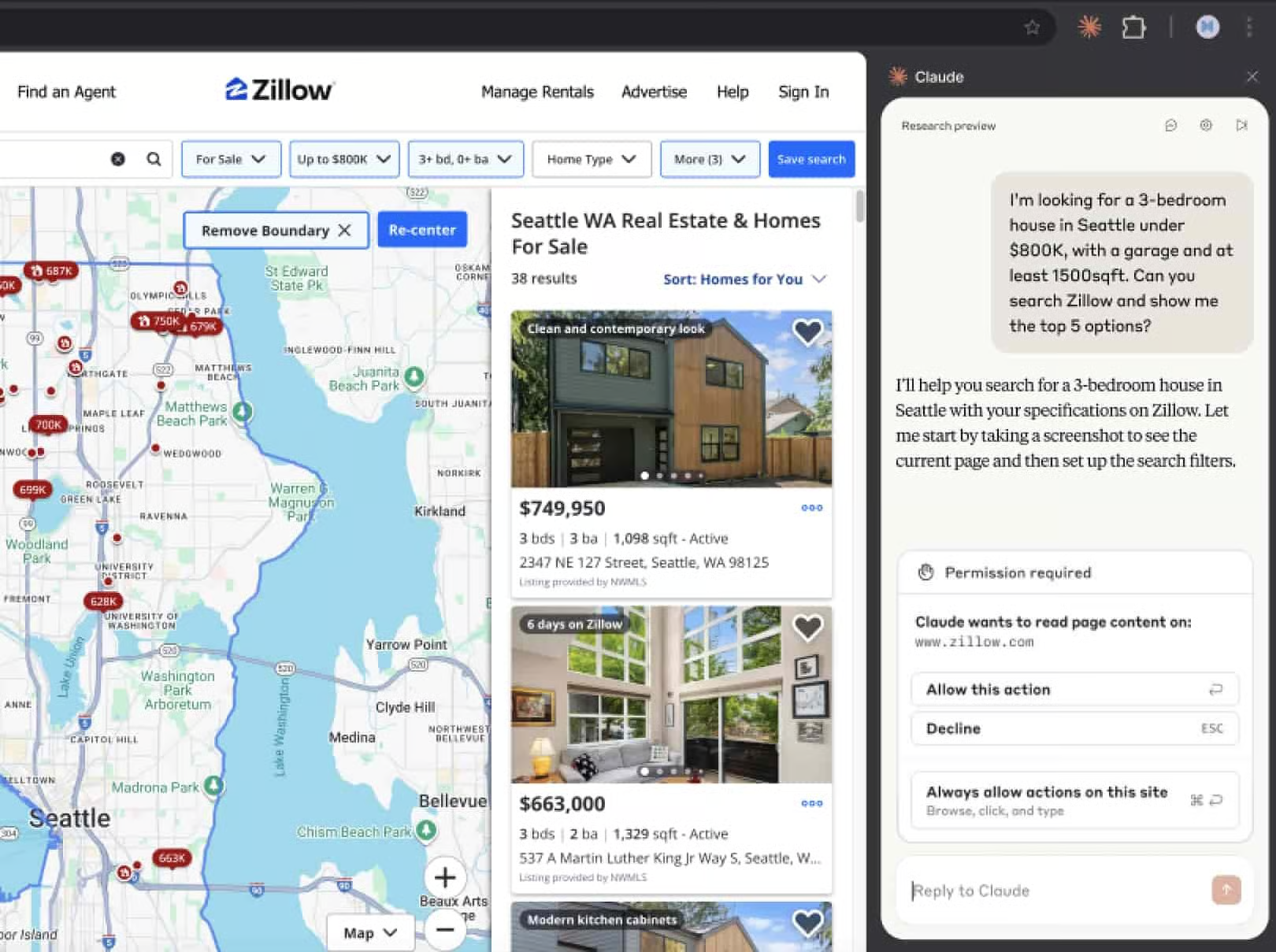
1️⃣ Install Claude In Chrome: Start by installing the Claude in Chrome extension from the Chrome Web Store. Once installed, Claude becomes available on any website you visit, without switching tabs or copying links.
2️⃣ Open The Site You Want To Research: Navigate to the website you want Claude to work with. This could be a marketplace like Amazon, a real estate site like Zillow, or any research-heavy page. Claude can see and understand the content on the page you are viewing.
3️⃣ Ask In Plain English: Click the Claude extension icon and type your request naturally. For example, you can ask it to find specific listings, compare options, or summarize results based on your criteria. No special syntax required.
4️⃣ Let Claude Interact With The Page: Claude can scan listings, click through pages, extract details, and evaluate options directly on your behalf. It behaves like a focused research assistant rather than a passive summarizer.
5️⃣ Get Filtered Results Instantly: Within seconds, Claude searches relevant sections of the site and returns the best matches based on your request. You get curated results without manual filtering or endless scrolling.
The Takeaway
Claude in Chrome removes friction from web research. By letting AI operate inside the browser instead of outside it, you save time, reduce cognitive load, and get answers faster without losing context.
As we prepare more "Growthful" content, we'd love to hear your thoughts on today's edition! Feel free to share this with someone who would appreciate it. 🥰