AI Mode Finds Hidden Gaps
⚙️ Build stronger content by answering the questions competitors overlook, then use Claude Code to upgrade your TV into a more useful connected-home interface.

Hey there 🧠
Ready for another day of staying ahead of the competition in the Growth race?
Oh and before we go ahead! If your friend sent this to you, be sure to subscribe here! So you don’t miss out on any editions.
In Partnership with AirOps
Your Next Content Priority Starts With This Research

Your next article costs time and budget. If AI answers the question before buyers reach your site, it's harder to justify the investment.
AirOps brings together Kevin Indig, Ross Simmonds, and Eli Schwartz’s webinar takeaways to help you choose content worth funding next.
- Kevin Indig reports informational clicks fell 35–60% over the past year. Give buyers a reason to visit with original research.
- Ross Simmonds’ research covered 380,000 B2B answers. Comparison pages dominated citations, making separate “alternatives” and “versus” pages worth prioritizing.
- Eli Schwartz recommends purchase-focused content with clear conversion paths.
Together, their findings give you a practical basis for deciding which pages deserve your team’s time as AI changes how buyers research.
💡 Google AI Mode Can Reveal What Your Content Is Missing
Most service pages answer the same obvious questions.
Google AI Mode’s follow-up prompts can expose the deeper questions buyers still have, making them a useful way to find content gaps.
Here’s how to use it.
1️⃣ Start With A Real Buyer Question: Enter a question your customer would genuinely search, then review the follow-up prompts AI Mode generates.
Those follow-ups often reveal concerns your existing page does not address.
2️⃣ Turn Missing Answers Into Content Briefs: If AI Mode repeatedly asks about pricing, eligibility, risks, thresholds, comparisons, or edge cases, add those topics to the page.
The goal is to answer the questions competitors leave unresolved.
3️⃣ Label What You Actually Know: Separate findings into categories such as observed, verified, client-supplied, inferred, or unknown.
This helps prevent plausible assumptions from being presented as facts.
4️⃣ Mine Existing Expert Knowledge: Podcasts, webinars, interviews, videos, and sales calls may already contain the answers.
Transcripts can help surface specific examples, fees, outcomes, or explanations that make the page more authoritative and differentiated.
5️⃣ Verify Before Publishing: Older interviews and informal conversations can contain outdated information.
Have the expert confirm important numbers, fees, claims, and examples before they go live.
Why It Works
AI search rewards pages that answer specific, useful questions clearly.
If your page sounds like every competitor, there is less unique information for AI systems to cite.
The Takeaway
Don’t guess what your page is missing.
Ask AI Mode what buyers are likely to ask next, then build those answers into the content before your competitors do.
💡 Turn Your TV Into A Clean Smart Home Hub With Claude Code
Your TV can do more than launch streaming apps.
With Claude Code, you can install a cleaner launcher and add smart-home controls directly to an Android TV or Google TV.
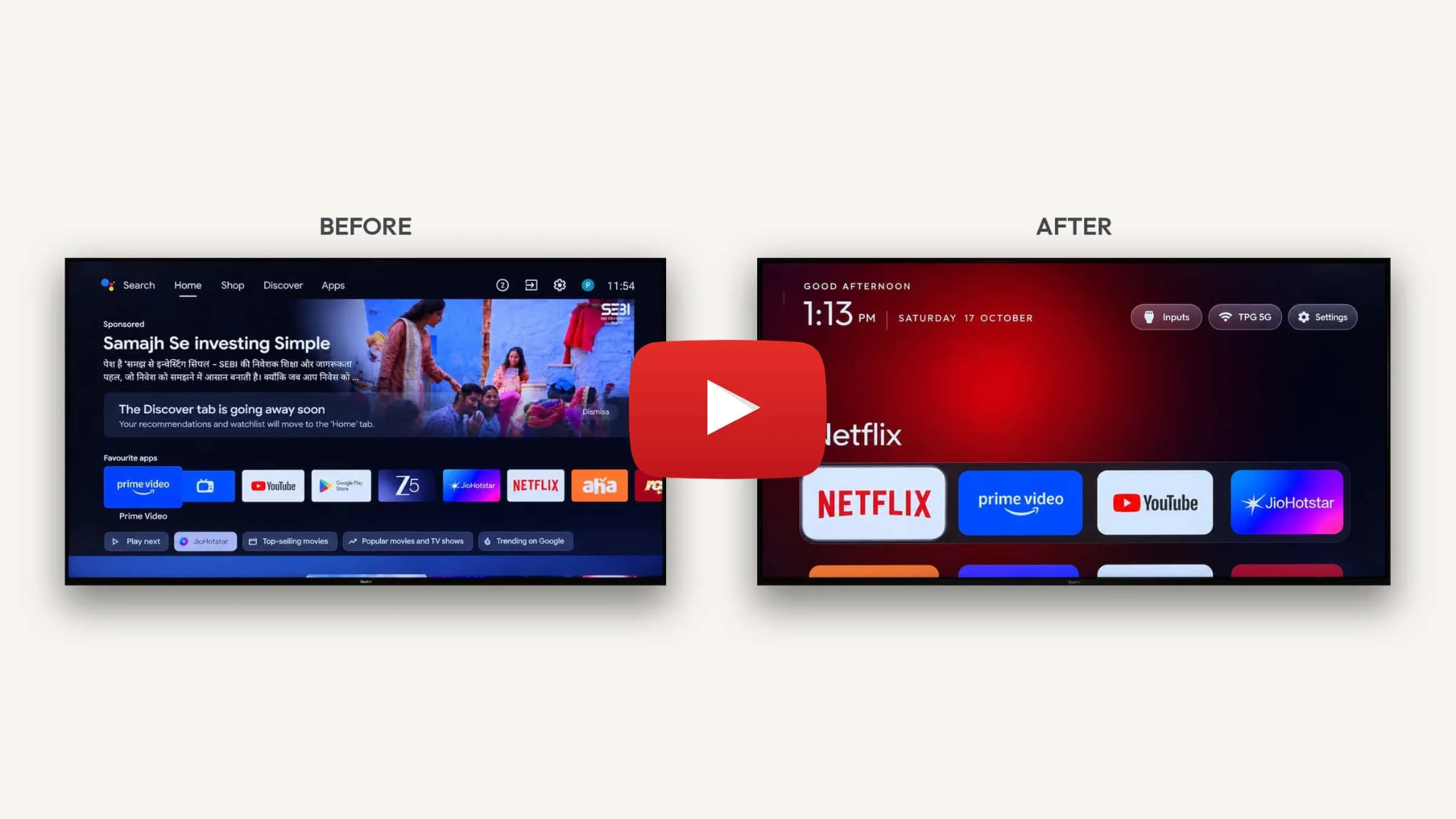
Here’s how to set it up.
1️⃣ Enable Developer Access: On your TV, open Settings > About and click the build number seven times.
Then enable USB or Network debugging and note the TV’s IP address.
2️⃣ Connect Claude Code To The TV: Open Claude Code on a Mac or Linux computer connected to the same Wi-Fi network.
Give it the TV’s IP address and ask it to install ADB if needed, connect to the device, and explain each command before running it.
3️⃣ Install A Cleaner Home Screen: Ask Claude Code to download and install Luma from its GitHub repository.
Approve the debugging request on your TV, then set Luma as the default home screen.
4️⃣ Customize The Interface: Pin your most-used apps, rearrange the layout, hide unwanted apps, and choose a living wallpaper.
The goal is to create a cleaner, more focused TV interface.
5️⃣ Add Smart-Home Controls: Ask Claude Code to install House Control TV.
Connect it to platforms such as Home Assistant, Smart Life/Tuya, or Philips Hue, then map your lights, AC, and other compatible devices.
You can also create scenes like Cozy, Movie, Night, or Away that control multiple devices and launch an app with one action.
Why It Works
Claude Code handles much of the technical setup while keeping you in control of each step.
The Takeaway
Don’t just upgrade your TV interface.
Turn it into a central screen for entertainment and smart-home control.
As we prepare more "Growthful" content, we'd love to hear your thoughts on today's edition! Feel free to share this with someone who would appreciate it. 🥰